
Information
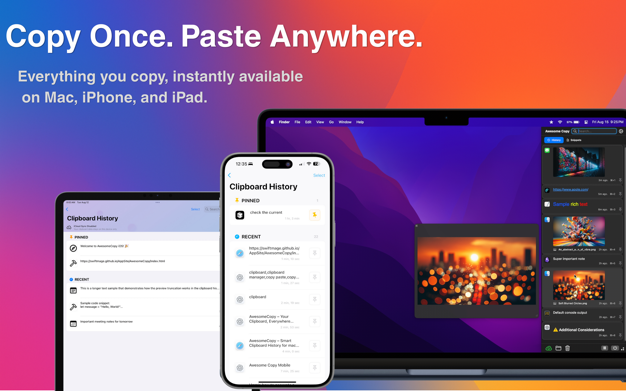
Awesome Copy Mac App: Is a full-featured clipboard history manager built for Apple users who value speed, design, and privacy.
It keeps track of everything you copy – text, images, links, files, and even music – so you can instantly revisit, reuse, and organize clipboard content anytime. Whether you’re a developer, designer, or power user, AwesomeCopy turns copy-and-paste into a fast, flexible workflow that feels native to macOS.
Dynamic Island-Inspired Notch File Preview
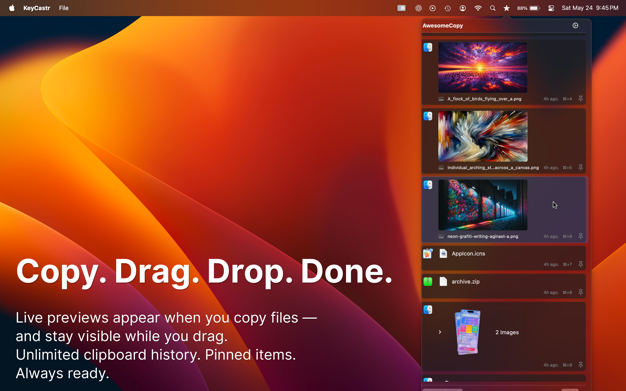
Experience visual feedback like never before. When you copy files, a sleek Dynamic Island-inspired notch preview appears at the top of your screen, showing what was copied. You can drag and drop directly from this preview into Finder, Desktop, or other apps. The same drag-and-drop support extends to your main clipboard history list, making file management faster and more intuitive.
iOS Companion App with Full Two-Way Sync
Take your clipboard anywhere. The Awesome Copy iOS app keeps your full clipboard history securely synced between Mac, iPhone, and iPad. With end-to-end encrypted iCloud sync, your copies, pins, and deletions stay perfectly aligned. Copy on iPhone and paste on Mac – or the other way around. It just works.
Privacy by Design
Awesome Copy is built for privacy from the ground up. All data is stored locally or securely in iCloud using Apple’s encryption. The app never tracks usage, never shares data, and never sends clipboard content outside Apple’s secure ecosystem. No analytics, no monitoring, no hidden servers – just a private clipboard manager you can trust.
Beautiful Themes, Built for You
Personalize your workspace with 16 beautiful themes ranging from bright and colorful to sleek and minimal. Whether you prefer a playful gradient or a professional look, AwesomeCopy adapts beautifully to your macOS theme and dark mode.
Awesome Copy Apple Intelligence Support
Awesome Copy works with Apple Intelligence to provide deeper insights about your clipboard items. Ask for context, get quick summaries, or understand your text – all privately and securely on device.
Awesome Copy Key Features
– Unlimited clipboard history
– Apple Intelligence support for clipboard items
– iOS companion app with secure, encrypted iCloud sync
– Quick paste pop-up menu triggered by customizable hotkey or middle mouse button
– Displays copy time and source app icon directly in the list
– In-list music album art and in-app playback support
– Quick search bar to instantly filter your clipboard list
– Image and file previews directly in the history list
– Dynamic Island-inspired notch preview for copied items with drag-and-drop
– Sixteen beautiful color themes
– Siri Shortcuts integration
– Rich text support with color and formatting
– Text transformations to automatically clean or modify copied content
– Sequential paste mode for cycling through items automatically
– Clipboard entry merging to combine multiple selections
– Drag-and-drop reordering of clipboard items
– Text-to-speech playback for selected entries
– Open or copy links directly from your history list
– Quick preview for all entry types, including images, audio, and text
– Open file locations instantly for images, files, or music
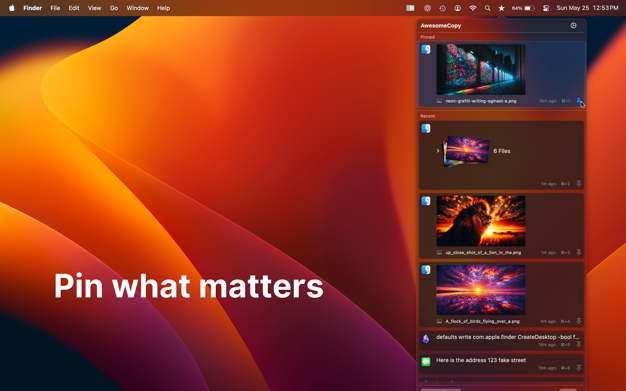
– Pin important items for quick access
– Create and save text snippets for later use
– Organize content with customizable categories
– Always Keep List on Top option
– Horizontal or vertical list orientations
– App Ignore Lists to exclude copies from specific apps
– Automatic masking of passwords copied from Apple Passwords
– Time-based list item retention (hour/day/week/month/year)
– Import and export your entire history for backup or transfer
– Auto-paste into the active app when selecting an item
– Built-in Optical Character Recognition (OCR) for image text detection and search
– Customizable global hotkeys
– Optional copy sound with 12 distinct sound effects
– Customize the menu bar icon with hundreds of built-in designs
– 7-day free trial
Developer Website: Evan Jones


