Information

ClickClack – Typing Trainer Boost your typing speed with a distraction-free and clean UI.
Upgrade to Pro for extra challenges, stats & unlimited custom text.
Key Features
Typing Speed Test:
• Timer-Based Session.
• Word Count-Based Session.
Lessons Practice Mode:
• Structured Learning: Improve your typing with guided lessons covering the home row, top row, bottom row, symbols, and number keys.
• Progress Tracking: Monitor your accuracy, WPM, and high scores over time for each lesson to see your growth at a glance.
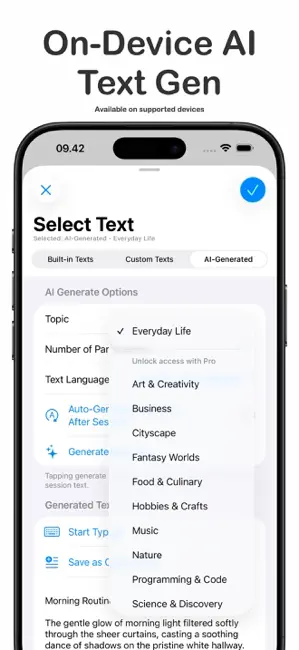
On-Device AI Text Generator & Typing Insights (Requires iOS 26 & Apple Intelligence Enabled)
• Infinite Content: Instantly generate unique, high-quality practice passages from various topics and supported languages.
• Typing Insights: Receive on-device AI analysis of your typing results, including speed insights, with deeper accuracy and consistency analysis available in Pro.
• Privacy First: All AI generation and analysis run locally on-device with zero data collection.
Detailed Typing Analytics:
• Performance Metrics: Calculates WPM (Net & Gross), Accuracy, and Consistency.
• Error Tracking: Tracks correct, incorrect, and missed characters.
• Level Progression Tracking: Earn XP from each typing session and unlock new levels as you improve.
• WPM Graph: Displays a graph over sessions to track your progress over time.
• Mistyped Keys & N-Gram Analysis: View a heatmap of your most frequent key errors and charts showing missing bigram/trigram sequences, helping you target weaknesses across keys.
Multiplayer Mode:
• Real-Time Matches: Compete in 60-second typing challenges with English text against 2–4 players.
• Play With Anyone: Invite friends directly or use automatch to quickly find opponents worldwide.
• Game Center Integration: Earn achievements and climb multiplayer leaderboards as you win matches.
VS CPU Mode:
• Race Simulated Opponents: Sharpen your typing skills by racing against AI opponents with adjustable difficulty. Choose how many CPUs to face, set their individual speeds, or let Smart Difficulty auto-tune the challenge based on your recent typing performance.
Custom Typing Text:
• Personalized Practice: Create and manage your own typing texts using your favorite quotes, song lyrics, or any text. Import directly from URL webpage
ClickClack Customizable Style:
• Typography: Choose your favorite font, adjust font size, line spacing, letter spacing, line break mode, and text alignment for a personalized experience.
• Themes: Select from a curated collection to match your mood and enhance your focus.
ClickClack Keyboard & Hand Guide Overlay:
• Activate the Keymap Overlay to visualize your keystrokes and next key targets in real time.
• Enable the new Hand Guide to see virtual hands showing correct finger placement — perfect for mastering 10-finger typing.
ClickClack Typing Sound Effects:
• Enhance your typing experience with satisfying sound effects that simulate real keyboards. Choose from a variety of styles like mechanical switches, typewriters, or use your own sound packs.
ClickClack iCloud Sync:
• Sync your comprehensive typing stats across iPhone, iPad, and macOS. Enjoy a unified experience and access your data anywhere, anytime.
Rated for ages 13+ by the Indonesia Game Rating System (IGRS)